Chapter 6
Samples
Play packs of audio files, chop them, stretch them, bounce your own.
Packs
s("pack") plays a pack of files, numbered from 0: "pack:3" is the fourth
file (the same as .i(3)). A sampler takes .fx() like any instrument.
drums: s("bd*4, ~ cp ~ cp, hh*8").vel("1 .6").postgain(0.35)
bass: s("pt_keys:2").note("c2 ~ c2 eb2 ~ c2 g1 bb1").postgain(0.35)
bell: s("pt_keys:1").note("<g3 bb3 c4 eb4>").vel(0.5)
.fx("Delay").param("Sync", "1/8.").postgain(0.35)| Pack | Has |
|---|---|
bd · sd · rim · cp · hh · oh · lt · ht | kick, snare, rim, clap, hat, open hat, low tom, high tom: one file each, from pt_kit |
pt_kit | a drum kit: 0 kick, 1 snare, 2 rim, 3 clap, 4 hat, 5 open hat, 6 low tom, 7 high tom |
pt_keys | one-shots at middle C: 0 pluck, 1 bell, 2 bass, 3 pad, 4 stab |
s("bd").bank("808") | a drum machine: the names above plus mt, congas lc mc hc, cr cymbal, cb cowbell, cl claves, sh maracas; "bd:3" is another dial setting |
pt_mallets · pt_piano · pt_perc · pt_synth | melodic and percussion packs |
Those are built in. Every other pack is a folder in your sample library
(~/.poptart/samples unless settings says otherwise), its files numbered in name
order. The sounds tab lists every pack: hold a file to hear it.
A folder in your sample library with a built-in pack's name, such as bd, plays in its place.
The first three rows are part of the page. The others download the first time a pattern names them and are kept after that. The sounds tab lists every pack: hold a file to hear it.
A folder on this computer: settings → sample library → choose folder… makes a pack of each folder of audio in it. Nothing is copied; a file is read when a pattern first plays its pack. On a later visit the browser asks before the page may read the folder again (allow again). A browser that can't keep a folder has it for the visit and offers keep a copy, which copies the files into its own storage.
From GitHub: samples("user/repo") reads a public repository and
makes a pack of each folder of audio in it, named after the folder. The line is code, so a
shared link carries it and whoever opens it hears the same files.
samples("user/drum-kits")                   // every folder of audio is a pack
samples("user/drum-kits@v2")                // a branch, tag or commit
samples("user/drum-kits/808")               // only that folder
samples("user/more-drums", "more")          // prefixed: more_bd, more_sn, …

beat: s("more_bd*4, ~ more_sn")-
The names last for the session: they come from the
samples()lines evaluated, and the later line wins a name two repositories share. The console says when that happens and offers prefix them. - A repository you always want goes in the prebake, and is there in every session.
-
A file is downloaded the first time it plays, then kept by this browser. settings →
downloaded packs lists each repository with its size: + puts its
samples()line back in the buffer, ✕ deletes its files. -
A kit (
sp(), below) remembers where each of its files came from, so it plays in a buffer without thesamples()line, and downloads what it needs if the files were deleted.
Your own files: drop audio on the code and it joins the files pack,
with the s("files:loop.wav") that plays it written where it lands.
The file is kept in this browser.Nothing is
copied: the pack plays each file from where it is. A library folder called files plays
in its place.
Sampler controls
s("hh*8")
  .begin(0).end(1)          // the region to play, 0..1
  .speed("1 -1")            // rate; negative plays backwards
  .note("c3 _ g3 c4")       // repitch: c3 plays as recorded
  .vel("1 .5 ~ 1")          // per-hit level
  .clip(2)                  // ring for two steps
  .adsr(0.01, 0.1, 0.8, 0.2) // envelope, in seconds; double-click adsr to draw it
  .loop()                   // keep looping for the hit's length
  .flip("<0 1>")            // play backwards into the next beat
  .stretch(2)               // twice as long, same pitch
A hit sounds for its step (times .clip()), then stops. To let one ring, give it a
longer step ("a@2", "a _") or a bigger clip. A patterned control makes
its own hits: s("x").note("c3 ~ e3") plays twice, with a gap.
stab: s("pt_keys:4").note("c3 ~ eb3 [~ g3] ~ c3 <bb2 f3> ~")
  .clip(1.5)
  .adsr(0.005, 0.12, 0.5, 0.15)
  .postgain(0.4)
sweep: s("pt_keys:3").note("c2").speed(-1).begin(0.2).vel(0.6)
  .fx("Reverb").postgain(0.3)
Every control is also a builder, which reaches into one control from inside a transform:
.mul(speed(-1)) flips whatever speed is set.
kick: s("bd*4").postgain(0.25)
hats: s("oh*8").vel("1 .5")
  // about 3 bars in 10 backwards
  .when(rand().gte(0.7), (x) => x.mul(speed(-1))).postgain(0.25)
Loops and chops
| Write | Does |
|---|---|
.fit(2) · .fit() | repitch so the file lasts two cycles · the nearest power of two |
.fit("stretch") | the same length, pitch held |
.thru() | play the file through, an event's worth per event |
.slice("0 1 2 3") | play the nth chop (transients, found automatically) |
.splice("<0 1 2>*8") | each chop fitted to its hit; .splicemode("stretch") keeps the pitch |
.slices(8) | chop into 8 equal slices instead |
.slices("1/8") | one slice per 8th of the fitted file; "1/8." and "1/16t" too |
.slices("break") | use the chops you drew (below) |
// eight random starts a bar, through a held pad
chops: s("pt_keys:3").fit(1).begin(irand(8).seg(8).div(8))
  .fx("Delay").param("Sync", "1/16.").postgain(0.4)
kick: s("bd*4").postgain(0.4)
// the pad fitted to two bars, cut on the 8ths and played out of order
chops: s("pt_keys:3").fit(2).slices("1/8")
.slice("0 3 [2 13] 5 8 11 <6 15> 7").postgain(0.4)
kick: s("bd*4").postgain(0.4)
A division is laid over the length the file is fitted to, so .fit(2) above makes
16 eighths. With no fit it is laid over the length .fit() would choose, and the
console says so. .slices("<1/8 1/16>") switches grid per cycle.
A loop of your own plays the same way:
s("files:loop.wav").fit().
If a fitted loop drops out, the region ran out before the step ended: .loop() it,
or use shorter steps. .log() prints the numbers for every hit.
A long file, a vocal or a whole take, plays out with
s("files:vocal.wav").fit("stretch").play(): it plays the sample through one
slice per cycle, each cycle starting where it points in the file, so play from any cycle
lands on the right part. With a whole-number fit every pass starts on the bar.
.log() says how many cycles it came to.
The slice editor
Double-click slice on a sampler chain to open the file with its chops drawn on it.
Drag a numbered tab to move a chop; double-click to add one, right-click a marker to remove it;
←/→ walk through them. Markers snap to transients unless you hold
alt; hold {mod} for fine moves. The wheel pans, {mod}-wheel zooms, {mod+0} fits.
fit sets how many cycles this file lasts, sens re-detects the chops (left keeps only strong hits, right finds ghost notes), grid chops evenly into 8ths, 16ths or triplets, and auto-slice goes back to detected chops.
What you draw is written into the code as a named set, used with .slices("break").
A set keeps markers per file, so one name covers a whole folder of breaks; [ /
] step to the other files the chain plays. Sets pattern:
.slices("<tight loose>").
Grains
.grain() plays the sample as a cloud of short overlapping grains cut from around
.begin(). It's still one voice per hit: .adsr() shapes the cloud and
.note() pitches it.
cloud: s("pt_keys:3").note("<[c3,eb3,g3] [bb2,d3,f3]>")
  .grain()                           // or .grain("<0 1>"), alternating
  .grainsize(0.08)                   // seconds per grain
  .grainrate(40)                     // grains per second
  .grainshape("pluck")               // each grain's window (double-click)
  .begin(saw(0.25).range(0.2, 0.6)   // a slow scan through the file…
    .add(rand().mul(0.02)))          // …each grain scattered around it
  .grainpan(rand().range(-0.6, 0.6))
  .adsr(0.4, 0.2, 0.8, 1.5)
  .fx("Reverb").postgain(1)
Size, rate, pan and a .begin() with no rhythm of its own are read by every grain, so
rand() scatters grains rather than notes and an LFO moves inside a held note.
.bend() repitches grains the same way.
Your own kit: sp()
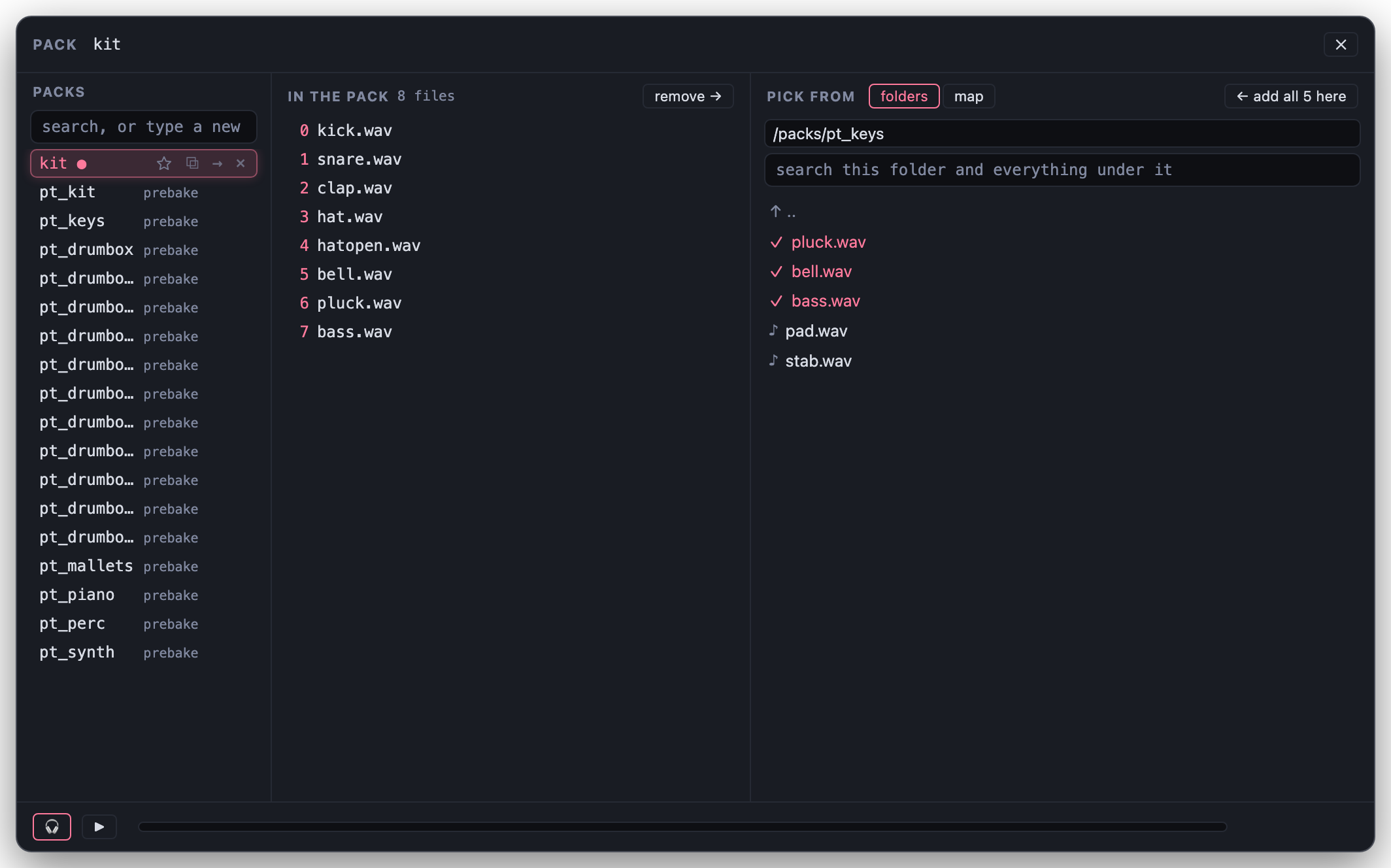
sp to build a kit from any pack.
sp("kit") is a pack you put together file by file: eight hits from four folders.
Evaluate a name nothing defines yet, or double-click sp, and the pack panel opens:
click files to add them, hold ▶ to hear one, reorder with the arrows. Play it like any pack:
sp("kit:0 kit:2").
The panel lists every pack as a folder: the built-in ones, what samples() read, your
sample folder and the files you dropped. A kit can mix them. The search box looks through every
file of every pack (break 170: all the words have to match), and ← on a selected pack
adds all of it.
The search box looks through everything under the folder you're in, not just what's listed:
break 170 finds every file with both words in its path. ← on a folder adds every audio
file under it.
The sample map
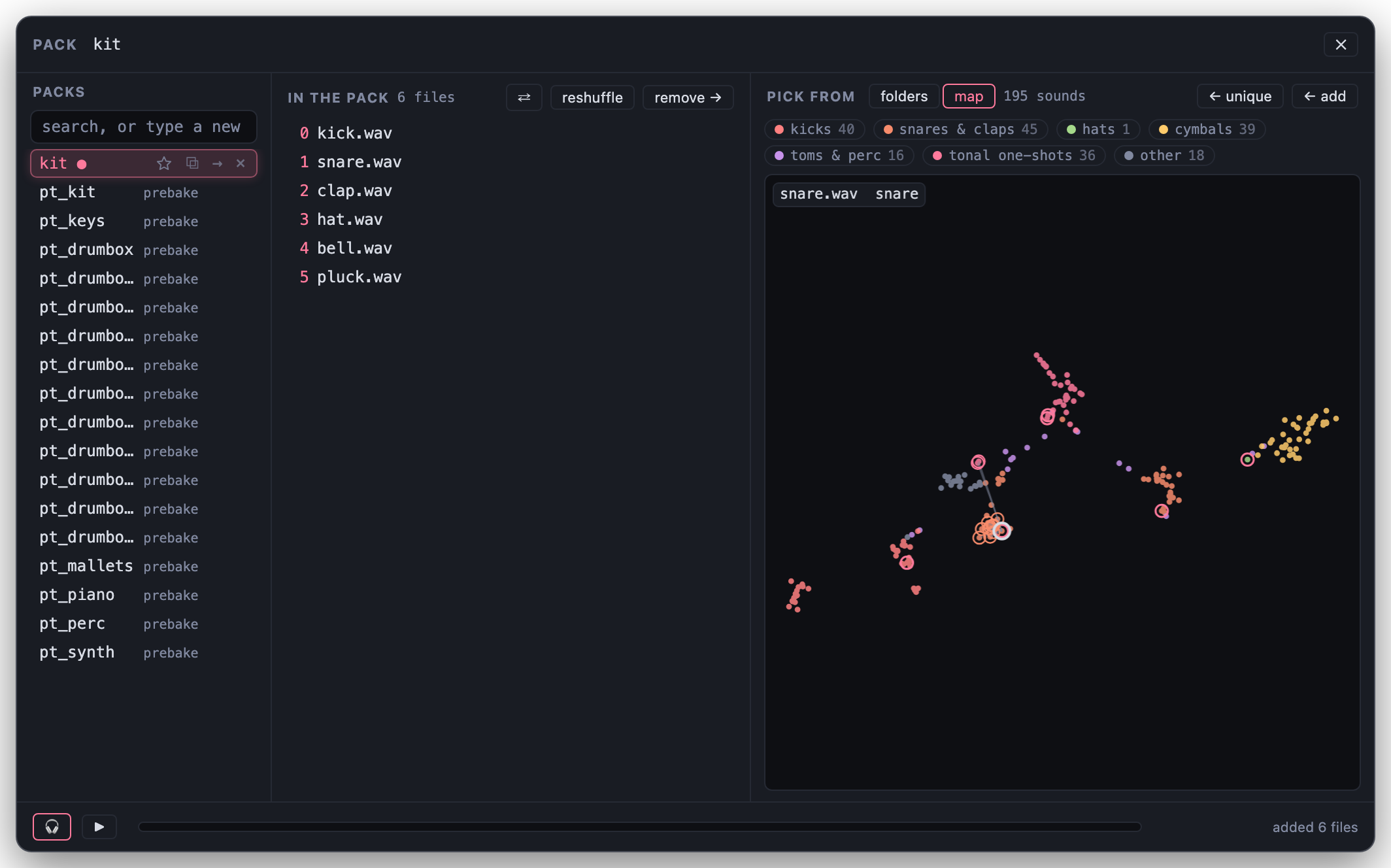
The pack panel's map view (or map in the sounds tab) places each sound near the ones that sound like it, colored by what kind of sound its name and its neighbors' names say it is. Click a point to hear it, ← to add it to the kit.
| ← unique | add the sound least like anything already in the kit |
| ⇄ · ] · [ | swap the selected entries for the next (or previous) sound like each |
| reshuffle | swap every entry at once |
The folders on the map are chosen in settings → sample map; the first build analyzes every file under them.
Every pack is on it unless settings → sample map narrows it. It's built the first time it opens, which reads every file of every pack once, so the first build is a download.
se("'hits/stab 01.wav'") plays one exact file under the samples folder (single
quotes inside, because a path has characters mini-notation would read).
Bounce a track
With the cursor in a block, {app+b} records that track from the next phrase for the cycles you choose. The source is muted and the bounce is written under the same name:
_bass: note("c2 eb2 g2 _").synth("Wavetable").record({ cycles: 8 })
bass: sr("bass").slow(8)
The mix doesn't move, and unmuting one line brings the synth back. Bounces are kept
in ~/.poptart/recordings/in this browser
and played with sr("name").