Chapter 7
The piano roll
A note pattern you draw instead of type.
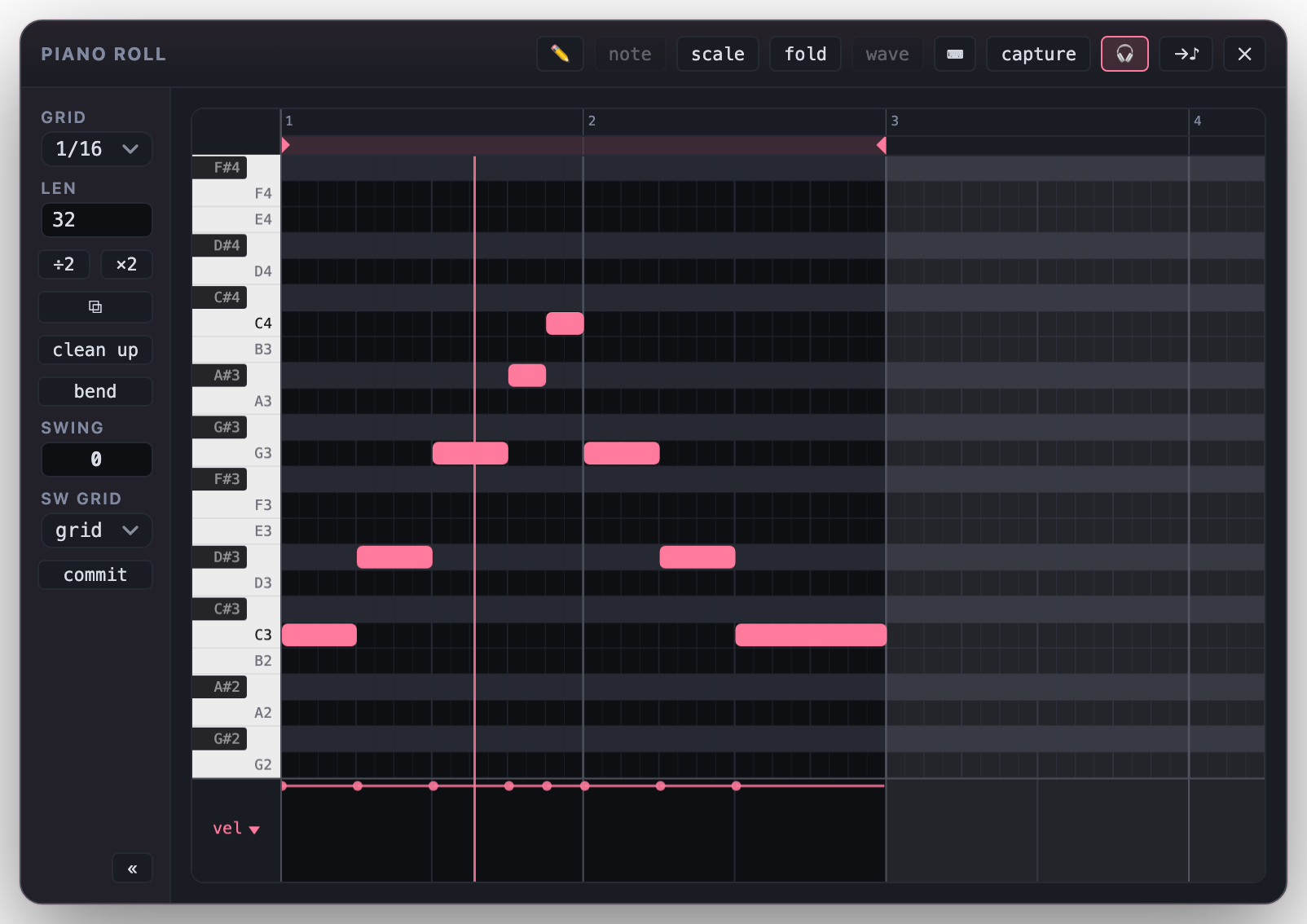
// double-click the word pianoroll
lead: pianoroll("lead").synth("Wavetable")
  .fx("Delay").param("Sync", "1/8.").postgain(0.8)

_roll("lead", "60,0,3 63,4,2 67,6,2 70,8,4 68,12,2 67,14,2", { grid: 16, len: 16 })
Double-click pianoroll and the grid opens over the editor. Rolls are named (a bare
pianoroll() takes its track's name), their notes are kept in a folded block at the
foot of the buffer, and names pattern: pianoroll("<verse chorus>"). The
panel's ▾ finds or makes rolls; ⧉ copies one.
Drawing
| To | Do |
|---|---|
| draw · erase | drag with the pencil · double-click a note |
| select | B for the arrow; click, shift-click, drag a box, {mod+a} |
| move · resize · copy | drag · drag the right edge ({mod} for any length) · {alt}-drag |
| nudge | arrow keys; shift+↑↓ an octave, shift+←→ a cell longer or shorter; {mod}+←→ moves the onset off the grid, {mod+shift}+←→ the length |
| velocity | {mod}-drag up or down |
| mute a note | 0 (again to unmute) |
| copy · cut · paste · duplicate | {mod+c} · {mod+x} · {mod+v} · {mod+d}, into another roll too |
| quantize | {app+q} |
| drop notes the loop doesn't play | {mod+j} |
| undo · zoom · close | {mod+z} · {mod}−/+ · Esc |
The options are { grid, len, start }: cells per cycle, cells in the loop, and the cell
the loop starts on, so { grid: 16, len: 24 } is a bar and a half of sixteenths. Drag
the loop bar rather than typing them. Notes outside the loop stay drawn, dimmed and silent.
The value lane
One marker per note along the bottom. Click the lane's label to switch between
vel, prob (a per-note chance) and nudge (a per-note timing
offset). With the pencil, sweep across it to paint: one gesture is a crescendo. Right-click to
randomize or reset.
The header
| ⧉ | repeat the loop after itself |
| ÷2 · ×2 | halve or double the rhythm of the selection, or of the roll |
| grid | change the grid without moving the music |
| 🎧 | hear notes as you draw them |
| ⌨ | play the track from your typing keyboard (Playing live) |
| →♪ | turn the roll into mini-notation in the code |
| fold · scale · key chip | hide empty rows · show only the key's notes · snap every note into the key |
On a sampler
Every note has a pitch, a file index and a slice, and the
note / index / slice button picks which the rows show. On index, the rows are
the pack's files, so pianoroll("beat").s("pt_kit")
is a drum sequencer. On slice, the rows are the chops of the note's file.
beat: pianoroll("beat").s("pt_kit").postgain(0.5)

_roll("beat", "60:0,0,2 60:4,2,2 60:1,4,2 60:4,6,2 60:0,8,2 60:0,10,2 60:4,10,2,0.6 60:1,12,2 60:5,14,2,0.7", { grid: 16, len: 16, mode: "index" })
Slice to notes: draw one long note over a break, right-click it, and it becomes one note per chop, each where its chop falls. Now the break is a rhythm you can rearrange.
What the roll writes
The note string folds to a small pill in the editor, but it is plain text:
pianoroll("60,0,4 64,0,4 67,8,8", { grid: 16 }) is
midi[:index[:slice]],start,length[,velocity] per note. A roll chains like
note(): .scale(), .add() and the rest.
lead: pianoroll("60,0,4 63,4,4 67,8,4 70,12,2 72,14,2", { grid: 16 })
  .synth("Wavetable")
  .fx("Delay").param("Sync", "1/8.").postgain(0.8)