Chapter 8
Arranging
Turn loops into a song by painting when each track plays.
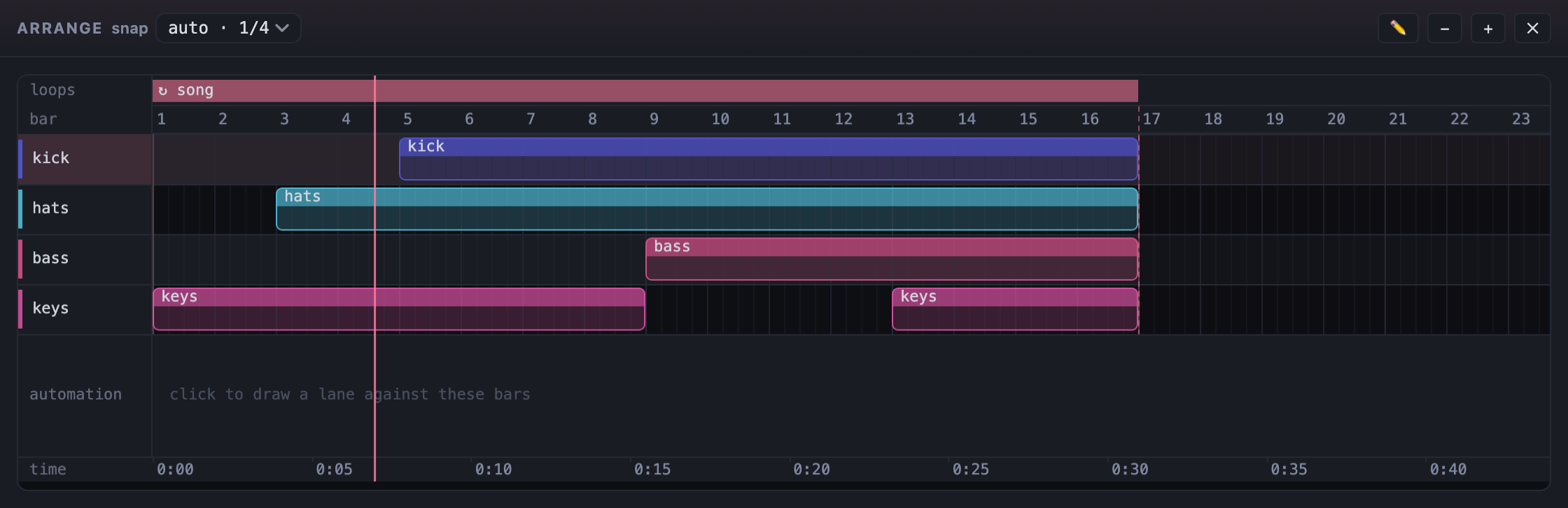
Painting clips
Press {app+a}. The arrangement replaces the editor: one row per track, bars along the top. Press it again to go back to the code.
- The first time, every track is filled from start to end, so nothing changes until you carve.
- Drag on a row to paint a clip. A track plays only inside its clips, and an empty row is silent.
- A track you add later arrives filled, so arranging never quietly drops a part.
- The song ends at the end of its last clip (the dashed line), and playback stops there.
What you paint is written into the code as one _arrange(…) line at the foot of the
buffer, which folds away. This is the song in the picture above:
setscale("C minor")

keys: n("<0 5 3 4>").sc(3).chord(7).synth("Wavetable").postgain(0.25)
hats: s("hh*8").vel("1 .5").postgain(0.3)
kick: s("bd*4").postgain(0.3)
bass: n("<0 5 3 4>").sc(1).ply(4).synth("Wavetable")
  .fx("Filter").param("Mode", "ladder").param("Cutoff", 0.4).postgain(0.4)

_arrange("keys,0,16 hats,2,14,o2 kick,4,12,o4 bass,8,8,o8", { tracks: ["keys", "hats", "kick", "bass"], loops: [["song", 0, 16]] })| To | Do |
|---|---|
| move · duplicate | drag a clip's title · {alt}-drag it (onto another row to give it to that track) |
| select several | {mod}-click, shift-click, or shift-drag a box |
| mark a stretch of song | drag in a clip's body; it moves and copies like a selection |
| resize | drag a clip's edge |
| split · join | {mod+e} at the marker · {mod+j} on what's selected |
| duplicate after · copy · cut · paste | {mod+d} · {mod+c} · {mod+x} · {mod+v} |
| mute clips | 0 (again to unmute) |
| undo | {mod+z} |
| zoom | + / −, or ctrl+wheel |
| play from here | click to place the marker, then {mod+enter} |
Inside a clip, the pattern starts where the clip starts: a <a b> begins on
a in every clip. Splitting or trimming a clip changes nothing you hear; a clip that
enters its pattern partway shows ▸bar after its title, and right-click →
enter at bar 1 resets it.
Double-click a clip to jump to its block in the code. Right-click for rename… ({mod+r}), which renames the track everywhere, and color….
Notes inside clips
A track written with clips() takes its notes from the clips themselves: each clip
holds its own, and double-clicking one draws in it. Copies share their notes until you choose
make unique in the clip's menu.
lead: clips().synth("Wavetable")
  .fx("Delay").param("Sync", "1/8.").postgain(0.8)

_arrange("lead,0,2,rup lead,2,2,rdown lead,4,2,rup lead,6,2,rdown", { tracks: ["lead"], loops: [["song", 0, 8]] })
_roll("up", "60,0,4 63,4,4 67,8,4 70,12,4", { grid: 16, len: 16 })
_roll("down", "72,0,4 70,4,4 67,8,4 63,12,4", { grid: 16, len: 16 })
Loop regions
Drag across the loops strip above the bars to mark a region and name it. Playback loops there every time it gets there. {app+l} (from the code, too) lets go of the loop you are in, and playback runs on to the next region or to the end. Stopping arms them all again. A new arrangement starts with one region over the whole song, so it loops until you remove it (right-click a region to rename or remove it). On the DJ desk the same chord is the deck's regions switch instead: the desk opens with them disarmed, so a song plays through like a record until you ask for them back. (The desk's own loop button beside it is a different thing - it loops where the deck is playing, and writes nothing into the song.)
Automation
auto("sweep") is a lane drawn against the song's bars, readable anywhere a signal
goes. Double-click auto to draw it under the clips.
pad: note("<[c3,eb3,g3] [ab2,c3,eb3]>").synth("Wavetable")
  .fx("Filter").param("Cutoff", auto("sweep").range(0.2, 0.8)).postgain(0.5)

_arrange("pad,0,8", { tracks: ["pad"], loops: [["song", 0, 8]] })
_auto("sweep", "0,0 6,1,-2 8,0")
The lane box names the lane you are drawing on: type to rename, ▾ to search or create. Pin several to read them against each other; a span copied from one lane ({mod+c}) pastes into another. Which lanes are pinned is saved with the song.
Groups
Select some tracks and press {mod+g}. They are wrapped in a group, which mixes them into one channel:
drums: group({
  kick: s("bd*4")
  snare: s("~ sd ~ sd")
  hats: s("hh*8").vel("1 .5")
}).fx("Reverb").param("Mix", 0.15).postgain(0.4)- The braces are the membership: where a track is written is where it belongs.
- An
.fx(),.postgain()or.bus()on the group applies to all of it, and the mixer shows it as one strip that unfolds. - Groups nest. A bare
main: group()receives every ungrouped track: that's where a mastering chain goes. _drums:mutes the lot,Sdrums:solos it. A marker on one member reaches only that member.- The caret beside the group's line folds it away, in the code and in the arrangement (where its members' clips then draw on its row).
- A group's own row can be painted too: its clips bring the whole group in and out.
- Right-click a group to ungroup it, or a member to take it out.
Within a loop, <a b>, .when() and .preset("<a b>")
vary a part. A second track in a group is for a section: a fill, an outro.
copy("kick") duplicates a whole track (kick2: copy("kick").fast(2));
pcopy("kick") takes only its notes.